Coming from KOReader
If you know KOReader's file browser and menus, here's the short version.
What Bookshelf is
Bookshelf is a plugin that draws a home screen over KOReader's file browser. The file browser is still there underneath. Books open in KOReader's normal reader, with all your reading settings, and nothing about reading changes.
It reads what KOReader already knows: covers and metadata from the Cover browser plugin, progress and status from each book's sidecar, history from your History, collections and favourites from KOReader's collections. So your Recent shelf is your history, a favourite in Bookshelf is a favourite in KOReader, and a collection you make in either shows up in both.
What stays the same
- The reader. Everything you do while reading is KOReader's.
- Your files. Bookshelf doesn't move, rename or rewrite books unless you ask it to, from a book's menu. It never edits an EPUB.
- The top menu. Tap the top of the screen as usual. Bookshelf adds one tab, with an open-book icon, second from the left.
- Gestures. KOReader's edge swipes for brightness and warmth, corner taps and the top-edge menu all still work over the shelf.
What's different
| You're used to | In Bookshelf |
|---|---|
| The file browser as home | Your shelf as home, via Start with (how) |
| Folders as the only view | Shelves: by folder, but also by series, author, genre, collection, status or any mix of filters |
| Mosaic or list display mode | Covers, a list or spines on a plank, chosen per shelf |
| Long-press a file for its menu | Long-press a book for a tabbed book menu |
| Collections in the file browser menu | Collections as shelves, or as tags on a book |
| A status bar while reading | The same, plus Bookshelf's own status line if you want it |
Where its settings are
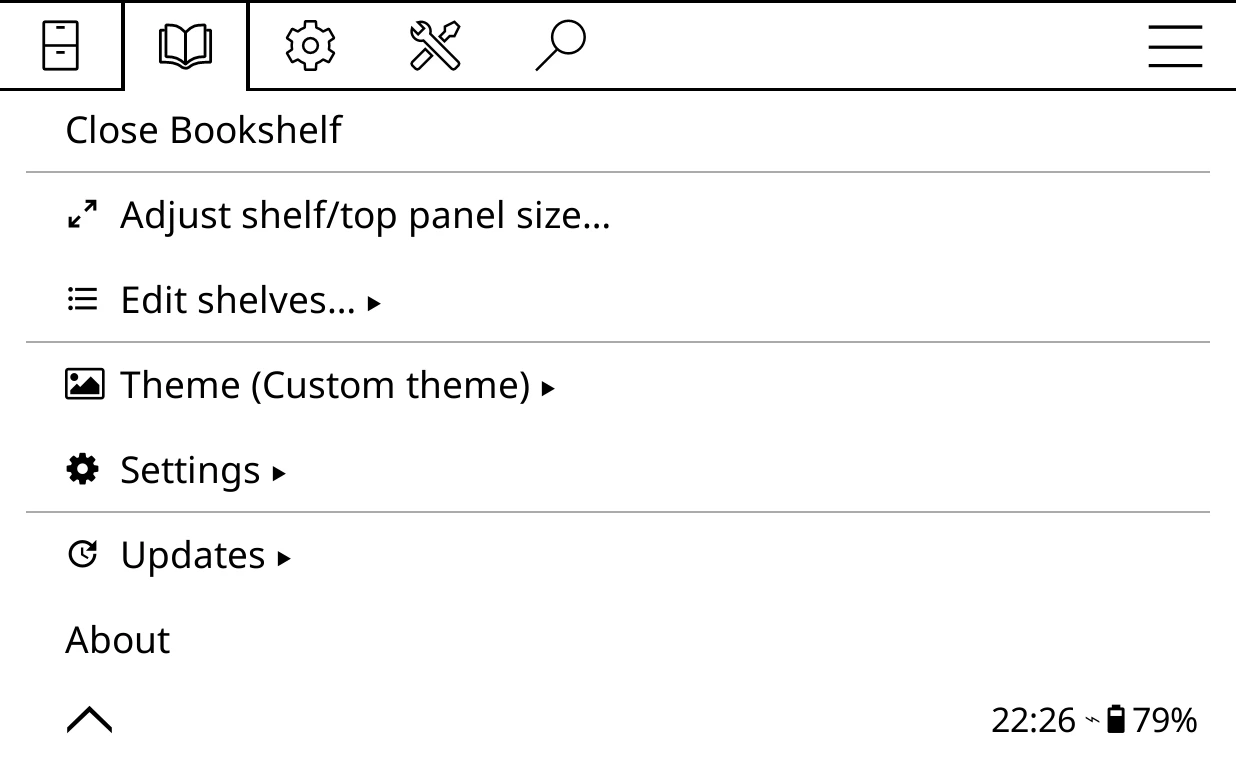
Everything is in the Bookshelf tab of KOReader's top menu, which only exists while the shelf or the file browser is showing:
- Open Bookshelf / Close Bookshelf: in and out of the shelf.
- Adjust shelf/top panel size…: columns and rows.
- Edit shelves…: show, hide, reorder and add shelves.
- Theme: wallpaper, plank, ornaments and colours.
- Settings: everything else, from the top panel's content to gestures.
- Updates and About.
While a book is open there's no Bookshelf tab. If you want Bookshelf's menu while reading, add Bookshelf menu to the start menu.
Things worth knowing
- Leaving a book is instant. Bookshelf shows the shelf straight away and finishes closing the book at the next quiet moment: when you open another book, after about half a minute of inactivity, or when you leave the shelf. If a sync plugin or user patch of yours expects the book to close the moment you leave it, turn off Bookshelf > Settings > Advanced > Performance tweaks > Instant book close (beta) and books close fully before the shelf appears.
- On the shelf, Bookshelf's own gestures come first. It uses swipes up and down, pinch and spread, and long-presses on books, tabs and the page counter (the full list is in Gestures). Your KOReader gestures still work wherever Bookshelf doesn't use that gesture, and the top-edge menu and the edge swipes for brightness and warmth always pass through. To give a gesture back to KOReader, switch Bookshelf's off under Bookshelf > Settings > Behavior > Bookshelf gestures.
- Actions for the Gesture manager. Under the gear tab, Taps and gestures > Gesture manager, you'll find sixteen Bookshelf: actions: open or close, next shelf, full screen, open start menu, go to home screen and more. See Gestures.
- Page counts. EPUBs have no page count until something lays them out. Spine widths and page badges use them, so if your spines all look the same width, run Extract page counts.
- Calibre users. Bookshelf can read
metadata.calibrefor Calibre's series, tags, author sort and custom columns. See Calibre, Kindle and Kobo libraries. - Labels are American English. Menu labels read Favorites, Color and Behavior, as they do in KOReader. These pages quote them exactly.
Other home-screen plugins
Project: Title replaces KOReader's Cover browser and asks you to turn Cover browser off. Bookshelf needs Cover browser for its covers and book details, so the two don't run together.
SimpleUI and Bookshelf are both home screens. Both can be installed, but only one can be KOReader's Start with choice. Pick the one you want to land on.
KOReader's own Cover browser mosaic and list modes are untouched: they're what you see in the file browser when Bookshelf is closed.
What it costs
- Battery and speed. In testing on a Kindle Paperwhite, an idle shelf used under 1% of the CPU. Covers are scaled once and cached, so paging stays quick.
- Memory. A cover cache sized from your device's free memory. You can set it under Bookshelf > Settings > Advanced > Performance tweaks > Cover cache.
- Storage. A small scaled copy of each cover in
cache/bookshelf, which can be cleared at any time. - Background work you can turn off, all under Performance tweaks: Pre-warm shelf cache (prepares each shelf after start-up), Instant book close (beta), spine shadows and plank designs.
- Network. None unless you ask: author photos, Hardcover, online catalogues, update checks and internet micro-modules only fetch when you start them (or, for those modules, when Wi-Fi is already on).
Where Bookshelf keeps things, and how to remove it cleanly, is on Files, backup and removing.