Calibre, Kindle and Kobo libraries
Calibre
If Calibre manages your books, Bookshelf can read the metadata.calibre file Calibre writes when it sends books to your device. Turn on Bookshelf > Settings > Advanced > BETA: Read calibre metadata.calibre.
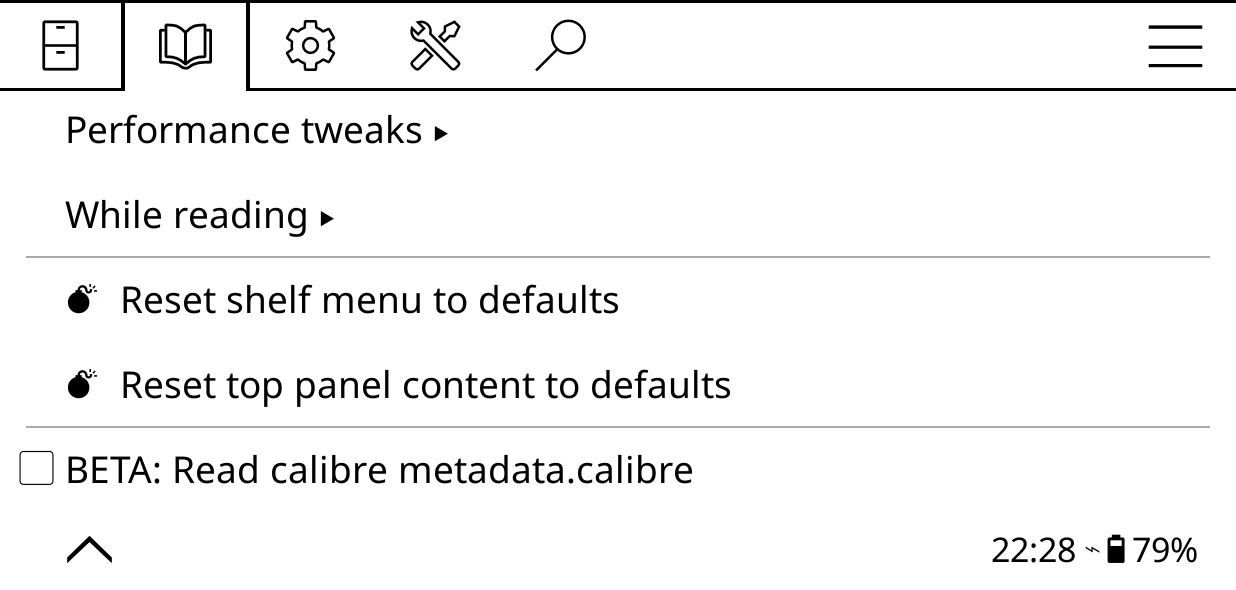
The file needs to be in your home folder, or the folder above it. That covers Calibre's usual place at the top of the device.
What you get:
- Calibre wins. Its title, authors, series, tags, language and description are used over the ones inside the book file, so edits in Calibre show up without converting books again.
- Author sort. Calibre's "Le Guin, Ursula K." orders your author shelves, hand edits included.
- Tags as genres, for genre shelves and filters.
- A second series. A book's series from a custom column of the Series type joins the Series shelf too, each with its own number.
- Any custom column in a line. A column
#moodshows with the token%calibre{mood}anywhere tokens work, including conditions like[if:calibre{mood}="cosy"]. - Page counts from a
#pagescolumn, for Extract page counts.
What custom columns can and can't do
Custom columns can be shown in any line and tested in a condition. They can't yet be a shelf source, a filter or a sort. If you want to shelve or filter by one, the dependable way is to mirror its values into Calibre tags, which become genres: then a genre shelf or genre filter does the job.
Wireless sync drops author sort and custom columns
KOReader's wireless Calibre connection rewrites metadata.calibre without author sort and custom columns. Bookshelf saves those fields beside it in calibre.bookshelf.json whenever it sees a file Calibre wrote (over USB, or a Calibre-managed folder), and merges them back after a wireless sync. So you keep them as long as Calibre has written the file at least once. A library only ever synced wirelessly has title, authors, series, tags and description, but no author sort or custom columns.
Big Calibre libraries
The file is read when KOReader starts and again after a sync changes it. A 64 MB metadata.calibre takes about six seconds on a Kindle Paperwhite, with a notice while it works; files over 64 MB are read without custom columns. Custom columns are what make these files big (Calibre repeats each column's definition on every book), so trimming columns you don't use is the quickest way to shrink it.
Who wins
Calibre's details win over the book file's. For books linked to Hardcover with Use Hardcover metadata on, Hardcover's title, author, series and genres win over both.
Kindle library
On a Kindle with the Kindle Virtual Library plugin installed, add a shelf with Kindle Virtual Library as its source. Your Kindle store books appear with their own covers, alongside your side-loaded ones.
- The first open converts the book, which takes a few minutes and can't be stopped. Bookshelf asks first, once per book. After that it opens straight away.
- Some books can't open: older protected MOBI and AZW files, and
.azw3. They say so when tapped. Most of a modern Kindle library is KFX, which is fine. - A new Kindle shelf starts with a Format filter that hides books KOReader can't open.
- The Kindle's own reading progress shows on the cover until you read the book in KOReader. It's never used as a reading position.
- Read-only: Move, Delete and Reset aren't offered for these books.
- Kindle books are included when you search your library, and can be linked to Hardcover for genres, ratings and covers.
Kobo library (beta)
On a Kobo with kobo.koplugin installed, add a shelf with Kobo library as its source for your Kobo store books. Filters and sorting work as on any shelf. Opening the books is the other plugin's job.
It's marked beta because it was built without a Kobo to hand. If something looks wrong, an issue helps.